Dataset Info
Information about the dataset can be displayed within the DIVE-DSA annotation tool be applying metadata to the folder of the dataset.
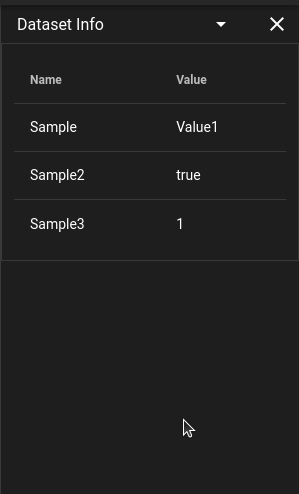
Utilizing the girder interface to add metadata or using the endpoint
PUT /folder/{girder_id}/metadata
with the key of datasetInfo will allow for meatadat to be added to the folder which will then be displayed in the user interface.
Attributes Panel in Dataset Info
When a track is selected and the dataset has attribute definitions, an Attributes panel appears in Dataset Info.
- Track Attributes show values attached to the selected track.
- Detection Attributes show frame-specific values for the selected track at the current frame.
- Empty sections are hidden automatically. For example, if there are no detection attributes, the detection section and its settings menu are not shown.
Stickiness (Detection Attributes)
Detection Attributes include a settings menu (:material-cog:) with a Stickiness toggle.
- When disabled, only values set on the current frame are shown.
- When enabled, empty current-frame values can reuse the most recent non-empty value from earlier keyframes.
- Inherited values are indicated in the value tooltip text.
Value Display and Tooltips
- Long values are truncated in-row for readability.
- Hovering a value shows the full text in a tooltip.
- Hovering attribute info (
:material-information:) shows datatype and predefined values (for text attributes with value lists).